
Create a New Account and Login to Your EK1 Game Account
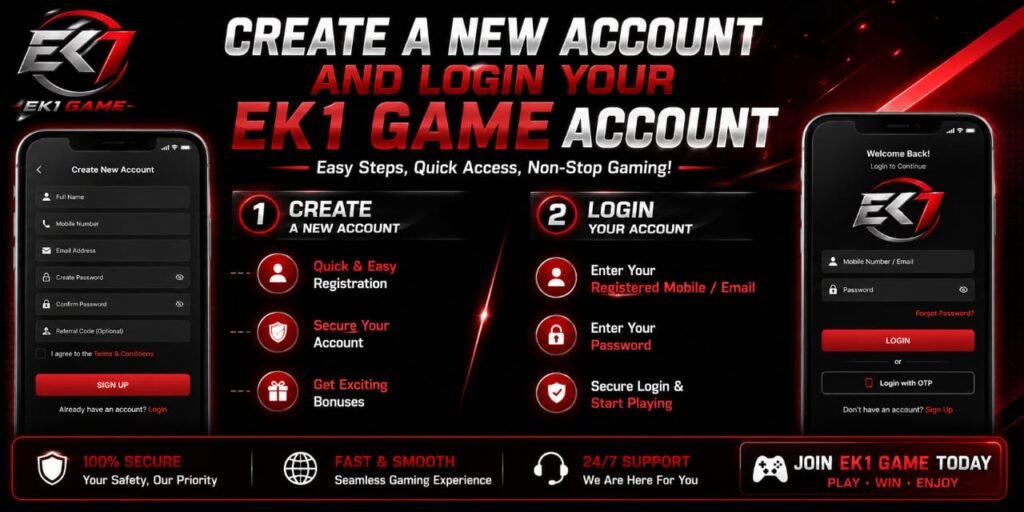
Creating an EK1 Game account can be straightforward when the registration and login process is followed carefully. A properly created account helps users manage their profile, access available features, and maintain their account information in one place. Before registering, users should always make sure they are using the official EK1 Game website or application and should review the platform’s terms, privacy information, age requirements, and local laws.
This guide explains the general EK1 Game account registration and login process, including the information commonly required, account-security practices, troubleshooting steps, and important precautions to consider before using an online gaming platform.
What Is an EK1 Game Account?
An EK1 Game account is a user profile that can be used to access features provided by the EK1 Game platform. Depending on the version and services available, an account may contain basic registration information, login credentials, account activity, and other settings.
Creating an account generally allows the platform to distinguish one user from another. It may also provide access to personalized settings and account-management functions.
Because account credentials can provide access to private information, users should treat their login details as confidential and avoid sharing passwords, verification codes, or other security information with anyone.
Things to Check Before Creating an EK1 Game Account
Before starting registration, we recommend checking several important details.
First, confirm that the website or application being used is official and legitimate. Avoid entering personal information on unknown websites, copied login pages, unofficial APK download pages, or links received from suspicious messages.
Next, review the platform’s terms and conditions, privacy policy, age requirements, and applicable restrictions. Some gaming and reward-based services may have different eligibility requirements depending on the user’s location.
Users should also ensure that their internet connection is secure and that the device has updated security software.
How to Create a New EK1 Game Account
The exact registration interface can vary depending on the current version of the platform. However, the process usually follows several common steps.
1. Open the Official EK1 Game Platform
Start by visiting the legitimate EK1 Game website or opening the official application. Check the domain name carefully before entering any information.
If the platform provides separate Register, Sign Up, or Create Account buttons, select the appropriate option.
2. Enter the Required Information
The registration page may request information such as a mobile number, email address, username, or password.
Enter information accurately and avoid using someone else’s details. If a verification code is required, use only the code sent directly through the platform’s legitimate verification system.
Never provide an OTP or verification code to another person.
3. Create a Strong Password
A strong password is one of the most important parts of account security.
We recommend creating a password that:
- Uses a combination of uppercase and lowercase letters.
- Contains numbers and special characters.
- Is not based on an easily guessed name or birthday.
- Is unique and not reused on other websites.
- Is stored securely if a password manager is used.
Avoid sending passwords through social-media messages or sharing them with friends.
4. Complete Verification
Some platforms require mobile-number or email verification before an account becomes active. Follow the instructions shown on the official registration page.
If the verification message does not arrive, check the entered information and wait a few minutes before requesting another code. Repeatedly requesting codes may sometimes create temporary delays.
5. Complete Registration
After entering the required information and completing verification, review the registration details before submitting them.
If everything is correct, complete the registration process. The platform may then redirect the user to the login page or account dashboard.
How to Login to an EK1 Game Account
Once an account has been registered, logging in generally requires the same credentials used during registration.
Step 1: Open the Login Page
Visit the official EK1 Game platform and select Login or Sign In.
Always verify the website address before entering your credentials.
Step 2: Enter Your Login Details
Enter the registered username, mobile number, email address, or other identifier requested by the platform.
Then enter the account password carefully.
Step 3: Complete Security Verification
If two-step verification, OTP verification, CAPTCHA, or another security check appears, complete it using the legitimate verification method.
Never disclose security codes to another person.
Step 4: Access Your Account
After successful authentication, the platform should open the relevant account dashboard or game interface.
If login fails, avoid repeatedly entering random passwords. Instead, check the credentials and use the platform’s official recovery process.
How to Recover an EK1 Game Password
Forgetting a password does not necessarily mean that an account has been lost. If the platform provides a Forgot Password or Reset Password option, select it from the official login page.
The recovery process may require verification through a registered phone number or email address. Follow only the instructions displayed by the legitimate platform.
If recovery messages are not received, check spam or blocked-message folders where applicable. Users should never pay an unknown individual claiming that they can recover an account.
Common EK1 Game Login Problems
Double-check spelling, capitalization, and numbers. Password fields are generally case-sensitive.
Verification Code Not Received
Confirm that the registered phone number or email address is correct. A temporary network or delivery delay may also occur.
Account Temporarily Restricted
Repeated failed login attempts can sometimes trigger temporary security restrictions. Wait for the stated period or contact the platform’s official support service.
Website or Application Not Loading
Check the internet connection and confirm that the official platform is accessible. Updating the application may also help if an older version is being used.
How to Keep an EK1 Game Account Secure
Account security should remain a priority after registration.
Use a unique password, enable available security features, and keep recovery information up to date. Do not install applications from unknown sources merely because they promise additional bonuses or special features.
Users should also be cautious of phishing messages. A fraudulent page can look almost identical to a legitimate login page while secretly collecting credentials.
Before logging in, check the website address and avoid suspicious shortened links.
Important Information About Deposits, Rewards, and Withdrawals
If an EK1 Game service involves money, deposits, withdrawals, paid entries, or monetary rewards, users should carefully review the applicable terms before participating.
Availability and legality of real-money gaming or reward services can vary by country, state, or jurisdiction. Users should confirm that the service is legally available where they live and should understand any applicable age restrictions.
Never assume that advertised rewards are guaranteed. Read the conditions, eligibility rules, wagering or usage requirements, fees, and withdrawal policies before committing money.
Users should also avoid borrowing money or spending funds they cannot afford to lose.
EK1 Game Account Safety Checklist
Before using an account, check the following:
- Use only an official website or application.
- Create a unique and strong password.
- Never share OTPs or passwords.
- Review privacy and account terms.
- Check age and location eligibility.
- Avoid suspicious APK files and unofficial login pages.
- Review financial terms before making any payment.
- Use responsible spending limits where applicable.
- Contact official support for account problems.
Conclusion
Creating and logging into an EK1 Game account generally involves opening the legitimate platform, completing registration, verifying the required information, creating secure login credentials, and using those credentials to access the account. The exact interface may change as the platform is updated, so users should follow the instructions displayed on the current official service.
Most importantly, account security should come before convenience. Protect passwords and verification codes, avoid unofficial websites, review the platform’s terms carefully, and make sure the service is appropriate and legally available in the user’s location. If real-money gaming or financial transactions are involved, users should understand the associated risks and never spend more than they can afford to lose.